Microsoft Excel 2021 Online Course – Beginner to Advanced

0 (0 REVIEWS)
68 STUDENTS

GET THIS COURSE AND 2500+ OTHERS FOR ONLY £49 FIND OUT MORE

Microsoft Excel is the most widely used spreadsheet software in the world, and strong Excel skills remain one of the most requested abilities in job listings across finance, marketing, operations, administration and data analysis. Our Microsoft Excel 2021 online course takes you from your very first workbook to confident, advanced use, with clear lessons built around real tasks.

You will start with the Excel 2021 interface and the basics of rows, columns and cells. From there, you will learn to enter and manage data, set up pages for printing, sort and filter large lists, and write formulas that do the hard work for you. Later sections cover advanced formulas, the powerful new XLOOKUP function, data tools, professional formatting, Pivot Tables and Charts.

Whether you want to boost your career, work faster in your current role or simply feel at home in a spreadsheet, this Excel 2021 course gives you a structured path to get there.

Key Features

Sneak Peek

What You Will Learn in This Excel 2021 Course

  • Navigate the Excel 2021 interface, ribbon and workbooks with confidence
  • Enter, edit and organise data quickly and accurately
  • Sort and filter data to find exactly what you need in seconds
  • Use advanced formulas including nested functions and logical tests
  • Replace VLOOKUP and HLOOKUP with the modern XLOOKUP function
  • Use Excel data tools such as data validation, Flash Fill and removing duplicates
  • Format data and create Excel Tables that look clean and update automatically
  • Create clear, attractive Excel charts that tell a story with your data

Certification

  • Instant digital certificate issued upon completion
  • Printed certificate available (postage charges may apply)
  • Certification recommended for renewal every 3 years to maintain knowledge
Training-Express-Certificate-CPD-QS-1-1

Who Is This Excel Course For?

This Excel 2021 training is designed for anyone who wants spreadsheet skills:

  • Complete beginners who have never used Excel and want to learn Excel online from scratch
  • Students and graduates who want an in-demand skill for their CV
  • Office and administrative staff who handle lists, reports and records every day
  • Business owners and freelancers who manage budgets, invoices and sales data
  • Professionals in finance, HR, marketing and sales who need to analyse data faster
  • Existing Excel users who want to upgrade to Excel 2021 features such as XLOOKUP

No prior experience is required. All you need is a computer with Microsoft Excel 2021 or Microsoft 365.

Why Choose Our Microsoft Excel 2021 Online Course?

  • Beginner to advanced in one course: one structured path covers everything from basics to Pivot Tables and Charts.
  • Learn at your own pace: study online anytime, on any schedule, and revisit lessons whenever you need.
  • Up to date with Excel 2021: includes modern features such as XLOOKUP that older Excel courses miss.
  • Career-boosting skills: Excel proficiency is valued in almost every industry and can help you stand out to employers.

Career Path

  • Data Entry Specialist
  • Administrative / Office Assistant
  • Junior Data Analyst
  • Accounts Assistant 
  • Financial Analyst (entry level)
  • Business Analyst
  • Project Coordinator

Course Curriculum

The detailed curriculum outline of our Microsoft Excel 2021 Online Course – Beginner to Advanced is as follows:

Begin your Excel journey here. Get an overview of the course, set up Excel 2021 and learn how to make the most of each lesson.

Learn the Excel 2021 interface, the ribbon, the Quick Access Toolbar and how to create, open and save workbooks. This is the foundation for everything that follows.

Master the building blocks of every spreadsheet. Insert, delete, hide, resize and move rows, columns and cells, and learn to select ranges quickly.

Enter and edit data efficiently using AutoFill, copy and paste options and smart shortcuts. Learn to keep your data organised, accurate and easy to work with.

Prepare spreadsheets for print with margins, orientation, scaling, headers, footers and print areas, so your reports look professional on paper and as PDFs.

Find and organise information in large datasets. Sort by one or several columns, apply filters and use custom criteria to focus on the data that matters.

Learn how Excel formulas work, from cell references to essential functions such as SUM, AVERAGE, MIN, MAX and COUNT. Understand relative and absolute references.

Take your formulas further with logical functions such as IF, AND and OR, nested formulas, text and date functions, and techniques for avoiding errors.

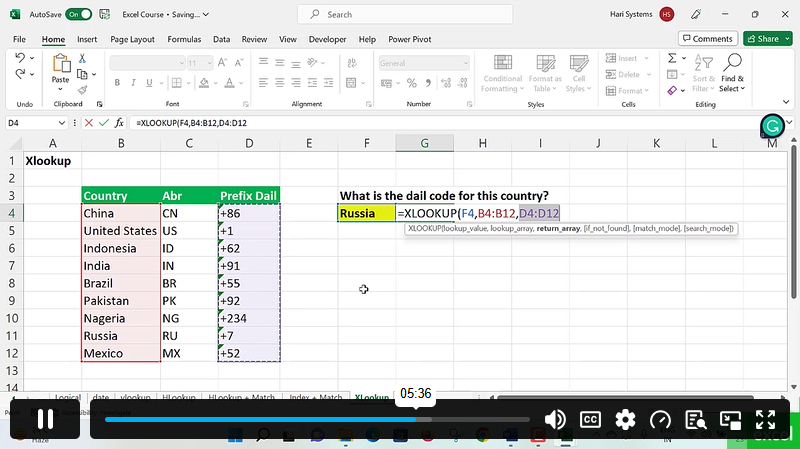
Discover XLOOKUP, the flexible lookup function that replaces VLOOKUP and HLOOKUP. Look up values in any direction, handle missing results and simplify complex lookups.

Use Excel’s built-in data tools, including data validation, drop-down lists, Flash Fill, Text to Columns and Remove Duplicates, to clean and control your data.

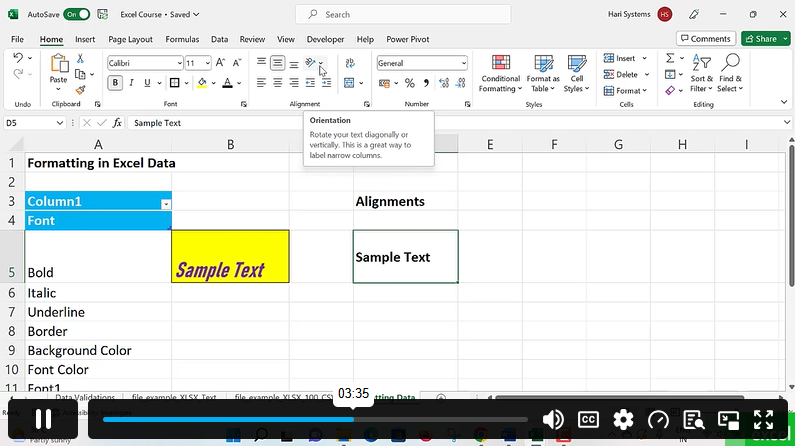
Make your spreadsheets clear and professional with number formats, styles and conditional formatting. Convert ranges into Excel Tables that expand and format themselves.

Summarise thousands of rows in seconds. Create, customise and filter Pivot Tables to analyse your data from different angles and uncover trends.

Turn numbers into visuals. Create and customise column, bar, line and pie charts, and choose the right chart type to present your data with impact.

Frequently Asked Questions

Is this Microsoft Excel 2021 online course suitable for beginners?

Yes. The course starts with the absolute basics and builds step by step, so you need no previous Excel experience.

Which version of Excel do I need?

You need Microsoft Excel 2021 or Microsoft 365. Most lessons also apply to Excel 2019 and 2016, but the XLOOKUP section works only in Excel 2021 and Microsoft 365.

What is XLOOKUP and why should I learn it?

XLOOKUP is a modern Excel function that finds values in a table or range. It is more flexible and easier to use than VLOOKUP and HLOOKUP, and it is quickly becoming the standard lookup function.

How long does it take to complete the course?

The course is self-paced, so you can finish it in a few weeks or take longer to fit your schedule.

Will I receive a certificate?

Yes. You receive a certificate of completion once you finish the course.

Course Curriculum

Getting Started
Introduction 00:03:00
Getting started on Windows, macOS, and Linux 00:01:00
How to ask great questions 00:01:00
FAQ’s 00:01:00
Section 01: Excel 2021: Basics
Excel Overview 00:06:00
Start Excel Spreadsheet 00:04:00
Enter Text and Numbers 00:07:00
Relative References 00:04:00
Working with ranges 00:07:00
Save and Save as Actions 00:08:00
File Extensions, Share, Export, and Publish files 00:07:00
Section 02: Excel 2021: Rows, Columns, and Cells
Adding Rows and Columns 00:03:00
Modifying Rows and Column lengths 00:06:00
Section 03: Excel 2021: Data Handling
Copy, Cut, and Paste 00:07:00
Copying Formulas 00:03:00
Section 04: Excel 2021: Page Setting Up and Print
Page setup options 00:07:00
Fit to print on One Page 00:03:00
Print Workbooks 00:03:00
Section 05: Excel 2021: Sorting and Filtering
Sorting Data Ascending Order 00:04:00
Sorting Data Descending Order 00:02:00
Filter Data 00:04:00
Section 06: Excel 2021: Writing Formulas
Creating Basic Formulas 00:06:00
Datetime Formulas 00:06:00
Mathematical formulas phase1 00:20:00
Mathematical formulas phase2 00:12:00
Section 07: Excel 2021: Advanced Formulas
VLOOKUP formula 00:12:00
HLOOKUP formula 00:04:00
Section 08: Excel 2021: XLOOKUP only for 2021 and Office 365
XLOOKUP 00:08:00
Handling #NA and Approximates match in XLOOKUP 00:11:00
Section 09: Excel 2021: Data and Tools
Split Text into columns 00:07:00
Flash Fill 00:07:00
Data Validation 00:07:00
Remove Duplicates 00:08:00
Import Data from Text files 00:07:00
Import Data from .CSV files 00:03:00
Section 10: Excel 2021: Formatting data and tables
Formatting Font 00:04:00
Formatting Alignment 00:06:00
Formatting Numbers 00:05:00
Formatting Date 00:03:00
Formatting Tables 00:06:00
Section 11: Excel 2021: Pivot Tables
Pivot Tables 00:07:00
Pivot Charts 00:02:00
Section 12: Excel 2021: Charts
Excel Charts – Categories 00:03:00
Elements of a chart 00:04:00
Creating Charts 00:02:00
Column or Bar charts 00:04:00
Formatting charts 00:04:00
Line Charts 00:02:00
Pie and Doughnut charts 00:04:00
Microsoft Excel 2021 Online Course – Beginner to Advanced
ex Vat

SAVE 84% - OFFER ENDS SOON

TAKE THIS COURSE

Or

  • Original price was: £125.00.Current price is: £20.00. ex Vat
  • 1 year
  • Course Badge
  • Course Certificate
  • 4 hours, 25 minutes
  • Gift this course
£20 /Unit Price
Total:
£100.00
Quantity:

Buying more than one of the same courses?

  • 50% discount for orders of 10+ courses
  • 60% discount for orders of 50+ courses
  • 70% discount for orders of 100+ courses

Looking for a more personalised package?

contact us now

Instructors

68 STUDENTS ENROLLED