Food Hygiene
 Health & Safety
 Safeguarding
 First Aid
 Business Skills
 Personal Development




Course Curriculum
| Quickbook | |||
| Getting prepared - access the software and course materials | |||
| The structure of the course – first things first! | 00:05:00 | ||
| Set up free trial | 00:03:00 | ||
| Getting started | |||
| Starting A New Company File | 00:11:00 | ||
| Setting up the system | |||
| set up nominal accounts | 00:11:00 | ||
| Enter opening balances | 00:02:00 | ||
| Reverse opening balances – accruals and prepayments | 00:07:00 | ||
| Report Journal | 00:05:00 | ||
| Nominal ledger | |||
| Amend The Nominal Ledger | 00:07:00 | ||
| Report listing the nominal ledgers | 00:02:00 | ||
| Customers | |||
| Enter customers | 00:09:00 | ||
| Report on customer contact information | 00:01:00 | ||
| Suppliers | |||
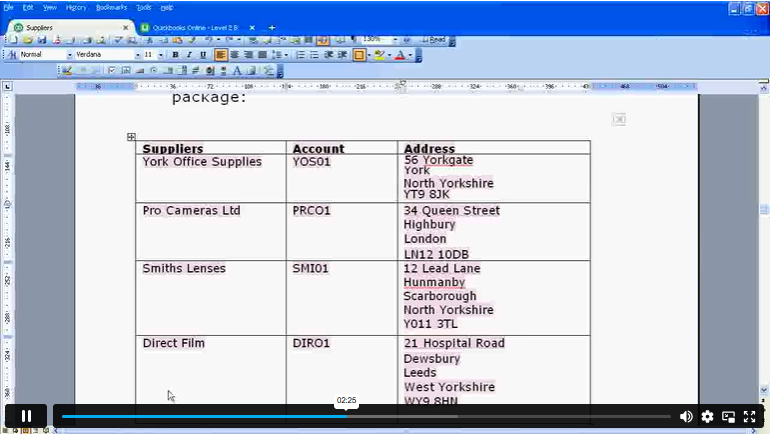
| Enter Suppliers | 00:05:00 | ||
| Supplier Contact List | 00:02:00 | ||
| Sales ledger | |||
| Enter Invoices | 00:09:00 | ||
| Invoice Entering | 00:03:00 | ||
| Invoice batch | 00:06:00 | ||
| Post Sales Credit Notes | 00:08:00 | ||
| Report showing Customer Activity | 00:03:00 | ||
| Aged Debtors | 00:02:00 | ||
| Purchases ledger | |||
| Post Supplier Invoices | 00:03:00 | ||
| Entering a Batch of Supplier Bills | 00:09:00 | ||
| Credit Notes Suppliers | 00:05:00 | ||
| Supplier Account Activity Report | 00:04:00 | ||
| Sundry payments | |||
| Post Cheques | 00:07:00 | ||
| Report showing supplier payments | 00:01:00 | ||
| Sundry receipts | |||
| Receipts from customers | 00:07:00 | ||
| Report showing customer receipts | 00:02:00 | ||
| Petty cash | |||
| Post Petty Cash Transactions and Report | 00:04:00 | ||
| Post cash payments to ledgers | 00:02:00 | ||
| Enter petty cash items | 00:14:00 | ||
| Report on Petty Cash Payments Proper | 00:06:00 | ||
| Post Sundry Payments | 00:05:00 | ||
| Receipts from customers | 00:07:00 | ||
| VAT - Value Added Tax | |||
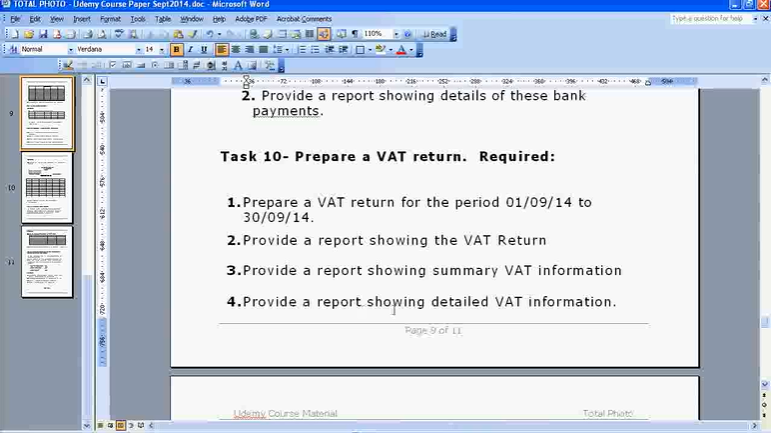
| VAT Return | 00:03:00 | ||
| Bank reconciliation | |||
| Reconcile The Bank | 00:10:00 | ||
| Provide A Report Showing Any Unreconnciled Transaction | 00:02:00 | ||
| Payroll / Wages | |||
| Post the Wages Journal | 00:08:00 | ||
| Posting Journal Adjustments | 00:02:00 | ||
| Reports | |||
| Month end adjustments | 00:03:00 | ||
| Month end reports | 00:06:00 | ||
| Tasks | |||
| Task- Crearing the accounts | 00:06:00 | ||
| Task – Customer report | 00:01:00 | ||
| Additional Resources | |||
| Course Paper | 00:00:00 | ||
| Further Reading – QuickBooks Online 2014 The Handbook | 00:00:00 | ||
| Xero Accounting | |||
| Getting Prepared - Access the software and course materials | |||
| Introduction To The Course And Your Tutor | 00:04:00 | ||
| Activating Your Free Trial With Xero | 00:02:00 | ||
| Getting started | |||
| Signing Up For The Free Trial | 00:04:00 | ||
| Create The Organisation | 00:08:00 | ||
| The Ficticious Scenario | 00:02:00 | ||
| Setting up the system | |||
| Add Bank Accounts To The System | 00:14:00 | ||
| Enter Opening Balances1 | 00:07:00 | ||
| Opening Trial Balance | 00:00:00 | ||
| Nominal ledger | |||
| Amend The Nominal Ledger | 00:06:00 | ||
| Chart Of Accounts Report | 00:00:00 | ||
| Customers & Suppliers | |||
| Enter customers | 00:07:00 | ||
| Reporting Customer And Supplier Information | 00:02:00 | ||
| Sales ledger | |||
| Enter Invoices | 00:07:00 | ||
| Invoicing tips – adding logo, repeat billing | 00:09:00 | ||
| Entering Invoices 6574 to 6610 | 00:16:00 | ||
| Post Credit Notes | 00:03:00 | ||
| Report Showing Customer Activity | 00:08:00 | ||
| Aged Debtors | 00:02:00 | ||
| Suppliers | |||
| Post supplier invoices | 00:09:00 | ||
| Enter suppliers invoices 6028 onwards | 00:14:00 | ||
| Enter More Supplier Invoices No 4308 Onwards | 00:06:00 | ||
| Credit Notes Suppliers | 00:02:00 | ||
| Supplier Activity Report | 00:04:00 | ||
| Aged Creditors Info | 00:01:00 | ||
| Reciepts from Customers | 00:10:00 | ||
| Apply Customer Credit Notes | 00:05:00 | ||
| Purchases ledger | |||
| Post Supplier Cheques | 00:08:00 | ||
| Apply Supplier Credit Notes | 00:03:00 | ||
| Print List Of Bank Receipts And Payments | 00:01:00 | ||
| Sundry payments | |||
| Post Sundry Payments | 00:07:00 | ||
| Make a credit card payment | 00:08:00 | ||
| Petty Cash | |||
| Add Petty Cash Transactions – Week 1 | 00:16:00 | ||
| Add Petty Cash Transactions – Week 2 | 00:12:00 | ||
| Add Petty Cash Transactions – Week 3 | 00:07:00 | ||
| Add Petty Cash Transactions – Week 4 | 00:09:00 | ||
| Imprest System on Petty Cash | 00:04:00 | ||
| Print a Copy of Petty Cash Receipts and Payments | 00:01:00 | ||
| Bad Debt | |||
| Writing Off A Bad Debt – Print Customer Statement | 00:02:00 | ||
| Write Off A Bad Debt | 00:09:00 | ||
| Credit Card | |||
| Reconcile The Credit Card Statement | 00:09:00 | ||
| Bank Reconciliation | |||
| Bank Statement As A CSV File | 00:27:00 | ||
| Bank Statement Closing Balances | 00:11:00 | ||
| Reconcile The Petty Cash | 00:05:00 | ||
| Payroll / Wages | |||
| Wages And Salaries | 00:09:00 | ||
| Post the Wages Journal | 00:07:00 | ||
| Report Wages Journal | 00:02:00 | ||
| Payday | 00:11:00 | ||
| Pay The Two Staff | 00:05:00 | ||
| VAT - Value Added Tax | |||
| Depreciation | 00:04:00 | ||
| VAT Return | 00:03:00 | ||
| Reports | |||
| Month End Reports PnL, BS, TB | 00:05:00 | ||
| Payroll unit | |||
| Using Payroll | 00:12:00 | ||
| Setting Up Employees | 00:10:00 | ||
| Running Payroll – An Example | 00:14:00 | ||
| Conclude | |||
| Recap And Next Steps | 00:06:00 | ||
| What happens next | 00:02:00 | ||
£20
ex Vat
TAKE THIS COURSE
SAVE 84% - OFFER ENDS SOON
Or
96% OFF
Take all courses for £49
- Original price was: £125.00.£20.00Current price is: £20.00. ex Vat
- 1 year
- Diploma
- Course Certificate
- 9 hours, 59 minutes Gift this course
Buying more than one of the same courses?
- 50% discount for orders of 10+ courses
- 60% discount for orders of 50+ courses
- 70% discount for orders of 100+ courses
Looking for a more personalised package?
contact us nowInstructors

3 STUDENTS ENROLLED